What is this course about?
Working with Play Spaces: From Initial Concept to 3D Model and Photorealistic Collage. Over 12 weeks, you will master advanced SketchUp tools and plugins, design a series of original children’s and sports micro-facilities (MAFs) while considering ergonomics and age-specific needs, and compile detailed technical specifications for production.
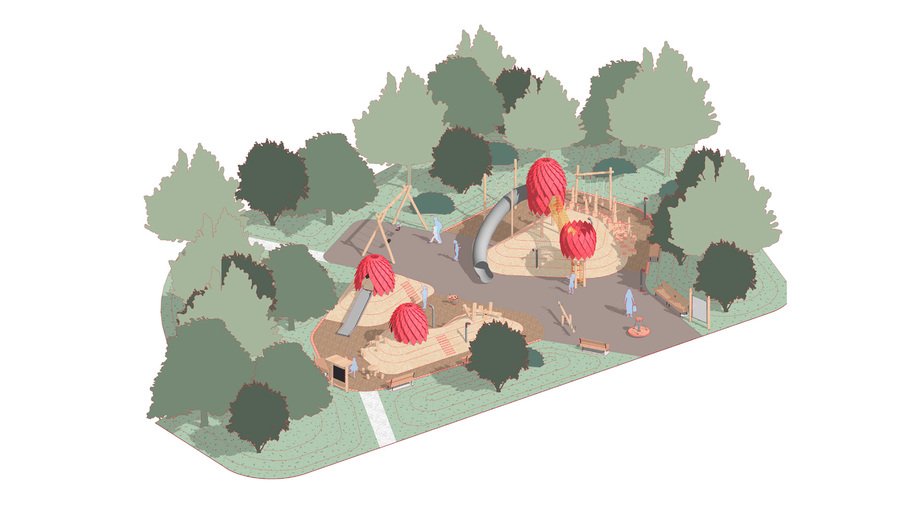
The final project for this course will be a sports and play cluster, utilizing original elements of playground equipment and sporting gear, visualized through collage techniques.
Who is this course for?
— For beginner and practicing landscape architects who wish to improve their SketchUp skills and deepen their knowledge of designing playground and sports equipment.— For architecture/environmental design students who want to take an advanced technology course and learn how children’s and sports facilities are created.— For people from other fields who are interested in landscape architecture, wish to start working in the field, or improve their SketchUp skills— For professionals in adjacent architectural fields who seek new competencies related to urban landscape design.
Course Duration: 12 Weeks
Class Format: In-Person
Contact Hours: 96 hours, including 72 hours of instruction and 24 hours of consultation
Course Prerequisites
— Completion of the Basic Course on MAF, «Author’s Urban Furniture in SketchUp: Modeling and Presentation,» or equivalent experience.
/ SketchUp Fundamentals and Plugin Usage
/ Ability to create simple collages in Photoshop— Ability to sketch ideas on paper or by any other convenient method. The ability to present and defend one’s ideas before an audience will be an advantage.Technical Requirements:
Operating System: Windows, macOS is not recommended.
Processor (CPU): Intel Core i5 / Intel Core i7 (or equivalent with similar power)
Video Card (GPU): NVIDIA GeForce RTX 30xx or RTX 40xx series (or equivalent with similar power)
RAM: 16–32 GB.SketchUp 2023 is recommended for ease of use with plugins and current modeling tools that are unavailable in earlier versions. Issues with plugin installation may arise in later versions, and visualization software compatibility issues may arise in earlier versions.
What will students learn?
— Selecting normative parameters and analogs for children’s and sports public amenities (MAFs) based on defined site conditions (Age, Location, Functionality)— Building a 3D model of the MAF using advanced modeling tools in SketchUp— Detailing the submission of the MAF 3D model in SketchUp: assigning materials and textures, applying UV plugins, and rendering scenes/views for presentation— Developing a concept for a thematic MAF under a specified narrative and environmental framework— Incorporating safety measures and ergonomic parameters into the structure (heights, fall zones)— Laying out the site by zones (play, sports, quiet, accessible environment) in AutoCAD, ensuring ergonomics and safe pathways— Compiling production technical specifications (ТЗ) for the manufacture of the MAF, including materials, notes, and execution options— Assembling a photorealistic collage of the MAF in its environmental context with correct scale (people, trees, city) and accurate perspective
Practical Assignments
Filling in Missing Technical Information
For the specified play element (slide/swing set/play structure), add the fall zone to the blueprint, indicate railing heights, clearances, and rounding radii, referencing the relevant standards and age groups.Modeling Based on Reference
Using advanced 3D modeling tools and plugins in SketchUp, play elements are created based on references (swing set, play structure, sandbox, freestanding slide).Material Application
Using texturing and styling tools in SketchUp, apply several different materials (metal, wood, reflective glass, gradient plastic) to one piece of outdoor equipment (MAF) created in the previous assignment.
Optional: Creating custom textures in Photoshop
Developing the MAF Concept
Create a mood board and sketches for a narrative play equipment concept, followed by a defense in a studio. Discussion with other course students, concept analysis, and idea presentation.
Technical Development of Play Structures (MAF)
Using knowledge of ergonomics and technical standards, adapt your playground concepts to meet these criteria and «ground» them in reality. Detailed design of safety zones and fall heights.Formulating a Sports and Play Cluster
Design a layout for the playground within the specified dimensions, tailored to the selected age group and scenario: zoning, placement of play equipment (MAF), circulation paths, and safety zones.Production Specification (Technical Brief)
Develop a detailed technical specification for manufacturing, specifying materials, paint colors, connection details, and fall heights.Final Presentation
Render the final playground using a collage technique in Photoshop. Incorporate staging, aerial and linear perspective, and detail the background (forest, urban setting).
Thematic Plan
/ Theory: The Importance of Children’s and Sports Playgrounds, MAFs in the City
/ Working in SketchUp, studying advanced functions and plugins. Curved and curvilinear forms
/ Typology of Children’s and Sports MAFs. Influence of age, standards, materials, safety, and certification
/ Conceptualizing Children’s and Sports MAFs. Developing narratives, play scenarios, and unique features
/ Designing the final series of Children’s and Sports MAFs in SketchUp, refining design solutions
/ Presentation in SketchUp + Photoshop, advanced collage, UV Sketchy
/ Drafting the final iconic MAF for production, working in AutoCAD, material selection
/ Technology and working with manufacturers
/ Finalization and Defense
01. Introduction. The Role of Children’s Playgrounds and Street Furniture in the City
— The place of playgrounds and sports areas within urban structure: social, environmental, and urban planning functions
— History of playground equipment and street furniture development
— The impact of a high-quality play environment on child development and population physical activity
— Review of global and domestic experiences. Typical solutions and thematic complexes.
— Limitations and certification complexityThe module concludes with a selection of preferred street furniture references, including an explanation of the choices made.
02. Working in SketchUp: Advanced Features and Plugins. Curved and Non-linear Shapes
— Advanced SketchUp tooling: dynamic components, layers, and tags
— Review of plugins for complex shape modeling (Shape Bender, Artisan, Pipe along Path, Helix along Path, Vertex Tools 2, Floor Generator, Fredo6 TopoShaper, Bevel, Scatter)
— Advanced work with Curvizard and Curviloft
— Creating fabrics, curtains, and cushions using ClothWorks, tightening, and fabric views
— Reference-based modeling, form analysis, and subsequent replicationThe module concludes with 4 detailed models of complex curvilinear elements for playground equipment, created using a reference in SketchUp.
03. Typology of Children’s and Sports MAF
— Typology of playground and sports equipment: by age, function, scenario, and installation method
— Age groups and their needs
— Regulatory framework: GOST, TR CU
— Fall zones, fall heights, clearances, radii of curvature, handrail heights
— MAF materials: wood, metal, plastic, composites, rubberized surfaces—properties and applicationThe module concludes with working on design documentation and filling in missing elements according to standards. Calculating fall heights and handrails for specific MAF installations.
04. Concept Development for Children’s and Sports MAF: Narrative and Play Scenarios
— Developing the idea and narrative quality of the playground. How studying the location engages a child
— Developing play scenarios and routes
— Mood board and sketches, generating initial ideas for visual metaphor and how this is resolved in the form of playground equipment
— Linking the narrative to the construction and materialsThe module culminates in a self-presentation of the playground concepts (7 objects) in a studio, combined with a discussion and idea exchange. Along with the concept presentation, students submit sketches.
05. SketchUp. Modeling Workshop for a Series of Game and Sports Kiosks (MAF)
— Massing, rapid volume generation for concept development, checking proportions and human scale.— Constructive detailing, breaking down masses into elements, load-bearing components, support axes, and ergonomic alignment.— Developing elements, modeling handrails, decking, decorative features, defining gaps, and working with bevels for rounded edges.The outcome of this module is a complete 3D model of the kiosk series, ready for refinement in subsequent stages.
06. Model Processing, Texturing, and Refinement in Photoshop
— UV unwrap and plugins for working with UV textures in SketchUp.
— Creating custom textures in Photoshop tailored to the project requirements.
— Exporting scenes and views from SketchUp: camera, shadow, and style setup.
— Advanced compositing in Photoshop, achieving photorealistic presentation, and advanced work with lighting and props. Adding environment and people.
— Photobash tools.
— Aerial and linear perspective, developing the background (forest, city).The outcome of this module is the creation of photorealistic collages (2–3 visualizations) in Photoshop that reflect the project concept.
07. Preparing Documentation for Production
— Transitioning from 3D models to technical drawings. Projections, assemblies, and annotations. Exporting views from SketchUp
— Working in AutoCAD. Formatting drawings, dimensioning, callouts, and specifications
— Layout management, understanding scale, and drafting culture
— Selecting materials for manufacturing. Completing the material listThe module concludes with a detailed drawing specifying the primary dimensions and heights of the final product. The technical specification also includes a list of materials, paint colors, and part assemblies.
08. Finalizing and Presenting the Final Product
— Assembling the final portfolio project. Refining visualizations, models, and technical drawings
— Structure and logic of the project defense
— How to tell the project’s story through visuals—interaction scenarios become part of the presentationThe module culminates in a complete presentation of the game sports cluster project, featuring demonstrations of models, collages, and technical drawings.
Final Project
A sports and play cluster, incorporating custom elements of children’s equipment and athletic gear, visualized through collage technique.
Attached to the project is the technical drawing documentation for production.