Concept
An online media platform for illustrators that helps develop visual acuity, find inspiration, and form a personal visual language through careful analysis of illustrations.
The media’s core idea is to transform passive image viewing into conscious observation and teach the appreciation of beauty in detail. The project’s main section features short analyses of illustrations, emphasizing specific artistic techniques. Rather than offering general assessments like «interesting composition» or «beautiful palette, ” the media focuses on small but expressive choices: unusual texture combinations, uneven contours, scale manipulation, color accents, or distinctive forms. Each analysis not only helps understand why an illustration is effective but also provides a technique that can be applied to one’s own practice. In addition to visual breakdowns, the media will introduce readers to contemporary illustrators, publish winners from competitions, and report on festivals, exhibitions, job openings, and industry trends. A dedicated focus will also be small creative exercises designed to encourage experimentation with techniques and move beyond conventional styles. The key distinction of the project is its combination of inspiration with practical utility. The media doesn’t just showcase interesting work; it teaches readers how to view, understand, and utilize the discovered artistic solutions for their own development. The project’s main value lies in cultivating the habit of closely examining images and independently finding new ideas within them. Not just collecting references—learning to analyze them.

Data Sources for Media
1.1. Professional Competitions and Festivals Resources for finding competitions, awards, festivals, exhibitions, and other professional events. — Bologna Children’s Book Fair — information on the international children’s book exhibition, illustrator competition, professional meetings, and educational programs. — World Illustration Awards — winner portfolios, shortlists, competition categories, and participant information. — iJungle Illustration Awards — international illustration competition, winner publications, and participation guidelines. — 3×3 International Illustration Show — competition entries and collections of professional illustration. — Society of Illustrators — exhibitions, contests, events, and publications by illustrators. These resources will primarily be used for the «Opportunities» and «Winners» sections.
1.2. Artists' Portfolios and Visual Platforms Sources for discovering interesting artists, illustrative techniques, visual solutions, and references. — Behance — portfolios of illustrators, commercial projects, and book and editorial illustration. — Pinterest — visual collections, thematic boards, and searching for stylistic directions. — Instagram — accounts of artists, studios, publishers, and illustration communities. — ArtStation — portfolios of artists, concept art, character, and digital illustration. — The AOI (Association of Illustrators) — professional projects, authors, interviews, and educational materials. These platforms will form the foundation for the «What We Like, ” „New Names, ” and „Illustration in Practice“ sections.
1.3. Publishing and Book Illustration Resources for tracking new illustrated books, author projects, book covers, and trends in the publishing industry. — Penguin Random House — new book releases, illustrated books, and author information. — Candlewick Press — children’s literature, book illustration, and artist portfolios. — Chronicle Books — illustrated editions, art books, and visual projects. — Tate Publishing — books on art, artists, and visual culture. — Publishers Weekly — book industry and market news. Materials from this group will be used for the features «Illustration in Practice, ” „New Voices, ” and „What We Love.“
1.4. Professional Media and Publications Resources for finding news, interviews, analytics, reviews, and emerging trends in illustration and graphic design. — It’s Nice That — features on contemporary artists, illustrators, and visual projects. — Creative Boom — artist interviews, professional advice, news, and curated work collections. — Communication Arts — professional projects, competitions, and publications in visual communication. — The Creative Independent — articles on the creative process, practice, and professional development of artists. These resources will help in generating topics for publications and tracking relevant directions in illustration.
1.5. Job Openings and Professional Opportunities Sources for finding work, internships, open calls, and job offers from publishers, studios, and companies. — The Dots — job openings, creative projects, and professional contacts. — Behance Jobs — collaboration opportunities and vacancies in creative industries. — LinkedIn — job openings at publishers, design studios, and companies. — Creativepool — work and collaboration opportunities for creative professionals. — Official websites of publishers and illustration agencies — information on open positions, internships, and portfolio submissions.
1.6. Educational and Methodological Resources Resources for preparing practical exercises, recommendations, and materials on developing visual thinking. — Domestika — courses on illustration, color theory, composition, and various materials. — School of Visual Arts — educational programs and materials on visual art. — Skillshare — practical sessions and exercises for illustrators. — Interviews with artists, author blogs, and professional masterclasses. These materials will be used to create our own editorial column with exercises, rather than for simply copying existing assignments.
Data schema segmented for human and machine processing
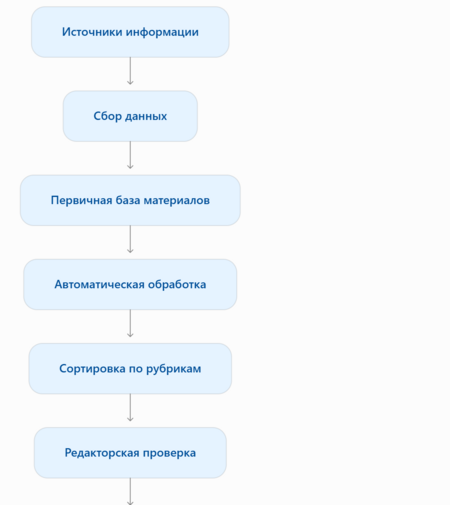
The media’s operational foundation proposes using a blended information processing system. In this system, automated services handle data collection, sorting, and preliminary processing, while the editor manages verification, selection, analysis, and final preparation of the published content. This division allows for a reduction in time spent on routine information retrieval while preserving the media’s distinct authorial voice. This is particularly critical for the main «What We Love» segment, as its value lies not merely in showcasing illustrations, but in uncovering interesting artistic techniques and explaining how they can be applied to one’s own practice.
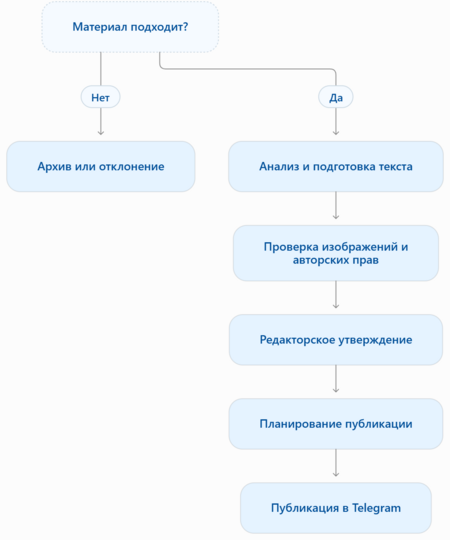
Data Flow Diagram


Data Processing
The automated component of the system is designed for continuous monitoring of the informational landscape and the preparation of materials for further editorial work.
The following stages are included:
- Information Gathering
Automated services track updates on selected websites and information channels. RSS feeds, newsletter subscriptions, notifications, and search alerts are primarily utilized.
The system collects: — New publications about artists and illustrators; — Information on competitions and festivals; — Announcements for exhibitions and professional events; — News from publishing houses and new book projects; — Job openings and collaboration proposals; — Educational materials and creative exercises.
- Primary Processing
After receiving the information, the automated system extracts core data and standardizes it into a uniform format. For instance, for a competition announcement, it can identify the title, organizer, dates, deadline, participation fee, and application link. For an illustrator feature, the system can pull out the author’s name, project title, year of creation, a link to the portfolio, and a brief work description. If any details are missing, they are flagged as unknown rather than being filled with assumptions.
- Sorting into Thematic Categories
Based on keywords and material content, the system suggests the most appropriate category: — «What We Love» — interesting illustrations and visual techniques; — «New Voices» — young and promising authors; — «Winners» — results from competitions and festivals; — «Illustration in Practice» — commercial projects, book publications, and brand collaborations; — «Opportunities» — competitions, job postings, exhibitions, and professional events; — «Exercises» — practical assignments and skill-building materials.
- Preliminary Material Card Generation
A separate database entry is created for every piece of material found. This entry contains essential information, a source link, the suggested category, and a review status. If necessary, the AI can draft a summary of the publication, highlight key facts, and propose several title options.
- Editor Notification
Once processed, the information is added to the central materials database, and the editor receives a notification.
Human Data Processing
Human editing is responsible for the quality, accuracy, and uniqueness of the content. It begins after the automatic collection and preliminary sorting of information.Key tasks of the editor:1. Material SelectionThe editor assesses whether the discovered artwork or news item aligns with the media’s theme, whether it interests the target audience, and if it holds practical or educational value.2. Information VerificationBefore publication, all details must be verified against the original source: the artist’s name, the artwork’s title, the date of creation, the event organizer, competition rules, deadlines, and links.3. Visual AnalysisFor the «What We Like» section, the editor independently studies the illustration and selects two or three interesting techniques to analyze.For example: — unusual use of scale; — work with a limited color palette; — combination of different materials and textures; — interesting distribution of details; — unconventional composition; — use of negative space; — techniques of visual storytelling. It is at this stage that the media’s core value is shaped—not merely showing a beautiful piece, but explaining what makes it interesting and what techniques can be learned from it.4. Publication PreparationThe editor writes the text according to the media’s tone of voice: using simple, clear, and unobtrusive language. Furthermore, the publication must contain a specific observation, rather than a general assessment of the illustration.5. Visual Material ReviewThe editor checks the image quality, verifies authorship, ensures the accuracy of captions, and confirms the artwork’s usability in the publication.6. Approval and PublicationAfter the text and visual materials have been reviewed, the publication is marked as ready. The editor determines the posting date and adds the material to the content plan.
Guidelines for Automated Services in the Scheme
Feedly — Monitoring Information Sources This service is used to track updates on thematic websites and blogs. Within it, you can create topical folders with sources, such as: — Illustration News — illustration news; — Competitions — contests and festivals; — Artists — artists and authorial projects; — Publishing — publishers and new book releases; — Education — educational materials. Feedly allows you to track RSS feeds and consolidate publications from various sources into a single interface.
Google Alerts — Finding New Mentions This service is used to search for information that does not appear in RSS feeds. You can set up notifications for the following queries: — illustration competition; — illustration open call; — illustrator wanted; — illustration exhibition; — picture book illustration; — new illustrators; — editorial illustration; — illustration festival. You can also track specific artist names, publisher names, and professional competitions. Google Alerts sends notifications about new search results based on the topics you specify. You can configure the frequency, language, and region of the results.
Make — Service Integration and Process Automation Make acts as a bridge between the other services. With its help, you can configure the automatic transfer of information from RSS feeds into a database, sending notifications via Telegram, and filtering materials by keywords. For example, when a new publication appears on the Creative Boom website, the system can automatically add its title, link, and date to the Airtable material database. Since Make supports scenarios involving RSS, Airtable, and Telegram, it can be used as the foundation for an automated editorial system.
- Airtable — Data Storage and Organization All information collected by automated services and the editor is stored in Airtable. The database is used for: — storing incoming materials; — sorting by categories; — tracking publication statuses; — keeping records of authors and projects; — deadline management; — maintaining the content plan.5. ChatGPT — Intelligent Material Processing AI is used as a supportive editorial tool. It helps process large volumes of information, identify key facts, and prepare preliminary text drafts. Potential tasks include: — determining the material’s theme; — assigning publications to categories; — drafting brief descriptions; — extracting information about competitions; — preparing title options; — suggesting tags; — identifying potentially interesting artistic approaches for further editorial analysis. Crucially, the final analysis of illustrations, evaluation of artistic merit, and approval of publications remain the responsibility of the human editor.
Automated Scenario Setup Guidelines
To ensure the system runs reliably, it is recommended to set up several individual scenarios in Make.
Scenario 1. Automatic Collection of New Materials Automation
- Feedly or an RSS feed detects a new publication.
- Make receives its title, date, link, and description.
- The system checks whether this material already exists in the database.
- If the material is new, a record is created in Airtable.
- The editor receives a notification about the arrival of new material.
Scenario 2. Automatic Classification AI Automation
- New material is added to the Airtable database.
- ChatGPT receives the publication text and primary metadata.
- The AI determines the presumed topic.
- The material is assigned one of six categories.
- The system generates a summary and suggests tags.
- The record is marked with the status «Requires Review.»
Scenario 3. Deadline Monitoring Automation
- The system locates a contest or event announcement.
- It extracts the application deadline.
- It saves this date to a dedicated Airtable field.
- It generates reminders for the editor 14, 7, and 2 days before the deadline.
- If the submission period has passed, the material is marked as «Completed» and removed from the selection of relevant opportunities. Before publishing, the editor verifies the deadline on the organizer’s official website, as dates and terms are subject to change.
Scenario 4. Preparing materials for publication Partial automation
- The editor changes the material status to «Approved.»
- The system receives the finalized text, tags, and publication date.
- The material is added to the publication queue.
- At the scheduled time, a notification is sent to the editor, or the publication is initiated via the configured tool.
- After placement in the database, a link to the published post is recorded. It is not recommended to automatically publish materials that have not yet undergone editorial review.